
Last updated on
Oct 31, 2026

AZ Preliminary Twenty Day Lien Notice 2011-2026 free printable template
pdfFiller is not affiliated with any government organization

Fill out
Complete the form online in a simple drag-and-drop editor.

eSign
Add your legally binding signature or send the form for signing.

Share
Share the form via a link, letting anyone fill it out from any device.

Export
Download, print, email, or move the form to your cloud storage.
Why pdfFiller is the best tool for your documents and forms


End-to-end document management
From editing and signing to collaboration and tracking, pdfFiller has everything you need to get your documents done quickly and efficiently.
Accessible from anywhere
pdfFiller is fully cloud-based. This means you can edit, sign, and share documents from anywhere using your computer, smartphone, or tablet.
Secure and compliant
pdfFiller lets you securely manage documents following global laws like ESIGN, CCPA, and GDPR. It's also HIPAA and SOC 2 compliant.
What is AZ Preliminary Twenty Day Lien Notice
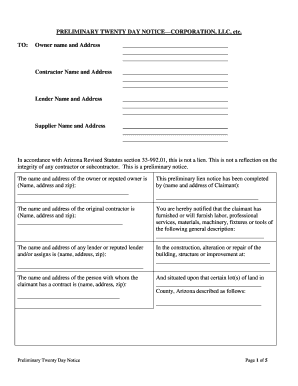
The Arizona Preliminary Twenty Day Lien Notice is a legal notice used by claimants to inform property owners about potential lien rights due to unpaid work or materials in construction projects.
pdfFiller scores top ratings on review platforms




Who needs AZ Preliminary Twenty Day Lien Notice?
Explore how professionals across industries use pdfFiller.

AZ Preliminary Twenty Day Lien Notice is needed by:
-
Contractors seeking to enforce payment rights
-
Subcontractors providing labor or materials
-
Suppliers of construction materials and equipment
-
Property owners needing to understand lien risks
-
Legal professionals involved in construction law
Comprehensive Guide to AZ Preliminary Twenty Day Lien Notice
What is the Arizona Preliminary Twenty Day Lien Notice?
The Arizona Preliminary Twenty Day Lien Notice is a vital legal document that serves to inform property owners about potential lien rights associated with unpaid labor, materials, or services in construction projects. This notice is fundamental for contractors, subcontractors, and suppliers who seek protection under Arizona law.
According to the Arizona Revised Statutes §33-992.01, this notice outlines the rights of claimants regarding unpaid contributions to a construction project. It is an essential protective step that helps ensure that individuals or entities providing services or materials receive compensation for their contributions.
Purpose and Benefits of the Arizona Preliminary Twenty Day Lien Notice
This lien notice is necessary for several reasons. Firstly, it formally notifies property owners, ensuring they are aware of the claimants' rights concerning unpaid services or materials. Secondly, the notice provides crucial legal protections, safeguarding the claimants' lien rights and minimizing potential disputes.
Understanding timelines for filing this notice is also crucial, as it defines the parameters for action and reinforces the claimant’s position. By delivering the notice promptly and accurately, claimants can effectively secure their rights, thus avoiding potential conflicts with property owners.
Key Features of the Arizona Preliminary Twenty Day Lien Notice
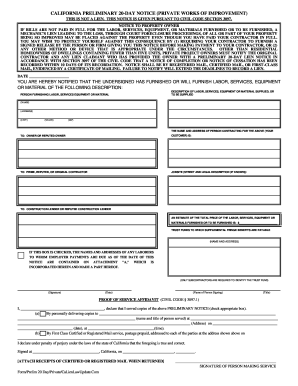
The Arizona Preliminary Twenty Day Lien Notice includes several required sections that must be accurately filled out. These sections comprise the owner's details, contractor’s information, specifics of the project, and the claimant's signature to validate the notice legally. It's crucial that these details are presented clearly to avoid misunderstandings.
The notice can be prepared for mailing via certified or registered mail. It features multiple fillable fields and a user-friendly design that simplifies the process of completing the form.
Eligibility Criteria and Who Needs the Arizona Preliminary Twenty Day Lien Notice
This notice is necessary for a range of projects that involve construction work. Adhering to the criteria for the filing requirements helps maintain compliance and protects the rights of those involved in such projects.
How to Fill Out the Arizona Preliminary Twenty Day Lien Notice Online (Step-by-Step)
Filling out the Arizona Preliminary Twenty Day Lien Notice online via pdfFiller is straightforward. Follow these steps:
-
Access the form on pdfFiller's platform.
-
Fill out each section accurately: provide the owner’s name, contractor’s details, project information, and your signature.
-
Utilize pdfFiller’s features, such as eSigning, which allows for a quick and secure signature process.
-
Save the completed form to ensure your data is recorded.
-
Prepare the final version for submission.
Attention to details is critical; even minor inaccuracies can lead to complications.
Submission Methods and Delivery for the Arizona Preliminary Twenty Day Lien Notice
To ensure the completed notice reaches the intended recipient, several submission methods are available. You can choose to send the notice via certified mail, registered mail, or use a certificate of mailing for additional security.
It is important to confirm delivery to the property owner to ensure that your notice has been received. Keep records of the delivery method used, as this could be crucial in disputes regarding receipt confirmation.
Common Errors and How to Avoid Them When Filing the Arizona Preliminary Twenty Day Lien Notice
When submitting the Arizona Preliminary Twenty Day Lien Notice, common errors can jeopardize its effectiveness. Frequent mistakes include leaving out required information, entering incorrect details, or failing to sign the form. Each of these errors can invalidate the notice.
To avoid these pitfalls, verify all recipient details and double-check the submission method. Conduct a final review of the filled form before sending it to ensure compliance with all requirements.
What Happens After You Submit the Arizona Preliminary Twenty Day Lien Notice
After the Arizona Preliminary Twenty Day Lien Notice is submitted, several outcomes can occur. One possibility is lien enforcement, wherein the claimant may take further steps to assert their rights if necessary. There is also a stipulated timeline for the property owner to respond to the notice, which is critical for claimants to monitor.
If the issue is not resolved after submitting the notice, claimants should be prepared to take the next steps, which may include seeking legal advice or pursuing further action to protect their rights.
Ensuring Security and Compliance When Completing the Arizona Preliminary Twenty Day Lien Notice
When handling the Arizona Preliminary Twenty Day Lien Notice, it is vital to ensure data security and compliance. pdfFiller utilizes 256-bit encryption to protect sensitive information. It's also compliant with GDPR, ensuring that your data is handled with the utmost confidentiality and in accordance with legal standards.
This commitment to maintaining privacy and security is crucial for anyone completing legal forms, allowing users to fill out, sign, and submit their documents confidently.
Better Manage Your Legal Forms with pdfFiller
pdfFiller offers a range of features designed to simplify the management of legal forms, including the Arizona Preliminary Twenty Day Lien Notice. This cloud-based platform allows users to easily fill, edit, and eSign documents without needing to download any software, thus providing ultimate convenience.
The platform also supports additional functionalities such as converting documents, organizing files, and sharing completed forms, all within a secure environment for user assurance.
How to fill out the AZ Preliminary Twenty Day Lien Notice
-
1.To begin, access pdfFiller and search for the Arizona Preliminary Twenty Day Lien Notice. Open the form from your account dashboard.
-
2.Once the form loads, familiarize yourself with the fillable fields and checkboxes using the intuitive pdfFiller interface.
-
3.Gather necessary information, including the owner and contractor’s names and addresses, the project details, and your signature before starting.
-
4.Fill in the owner or reputed owner's name and address in the designated field. Ensure accuracy as this information is critical.
-
5.Next, provide the name and address of the original or prime contractor, making sure to double-check for spelling errors.
-
6.After entering the basic details, locate the 'Date Signed' field. Enter the accurate date when you complete the form.
-
7.Once all fields are filled out, review the form for completeness by checking each section for missing or incorrect data.
-
8.Use pdfFiller’s preview feature to ensure all information appears correctly before proceeding.
-
9.To finalize the form, click on the 'Save' button to store your progress. If you are ready to submit, choose the 'Download' or 'Print' options to send it as required.
-
10.Lastly, follow the designated submission method — certified mail or registered mail with proof of mailing— to ensure proper delivery.

What are the eligibility requirements for filing this lien notice?
Any claimant who has provided labor, professional services, materials, or equipment for a construction project in Arizona can file this lien notice. It's essential to have documentation proving your involvement in the project.
Is there a deadline for submitting the Arizona Preliminary Twenty Day Lien Notice?
Yes, the lien notice must be served within 20 days after the claimant first provides labor or materials to a project. Failing to meet this deadline can jeopardize your lien rights.
How do I submit the completed lien notice?
The completed lien notice must be mailed, either via certified or registered mail, or delivered with a certificate of mailing. Ensure the notice is sent to the property owner to comply with state regulations.
What supporting documents do I need to accompany this form?
Typically, you should include any relevant contracts, invoices, or proof of delivery for the labor or materials provided. These documents help substantiate your claim under the lien notice.
What are common mistakes to avoid when filling out this form?
Common mistakes include providing inaccurate or incomplete contact information, failing to sign the notice, or missing the submission deadline. Double-check all details to prevent these issues.
How long does it take to process the lien notice?
Processing times can vary, but typically, once the lien notice is submitted, the property owner has a set period to respond. Keep track of this timeline to ensure you take necessary follow-up actions.
Can this form be notarized?
No, the Arizona Preliminary Twenty Day Lien Notice does not require notarization. However, the claimant must sign the document to validate it before submission.
Related Forms




Related Catalogs
Get the latest insights from our blog


If you believe that this page should be taken down, please follow our DMCA take down process
here
.
This form may include fields for payment information. Data entered in these fields is not covered by PCI DSS compliance.